QubeHub.ai

One platform. Modular by design.

One core holds the project, the price and the record. Everything else plugs into it — and reads the same truth.

Every module, in full.

One core holds the project, the price and the record.

Portfolio

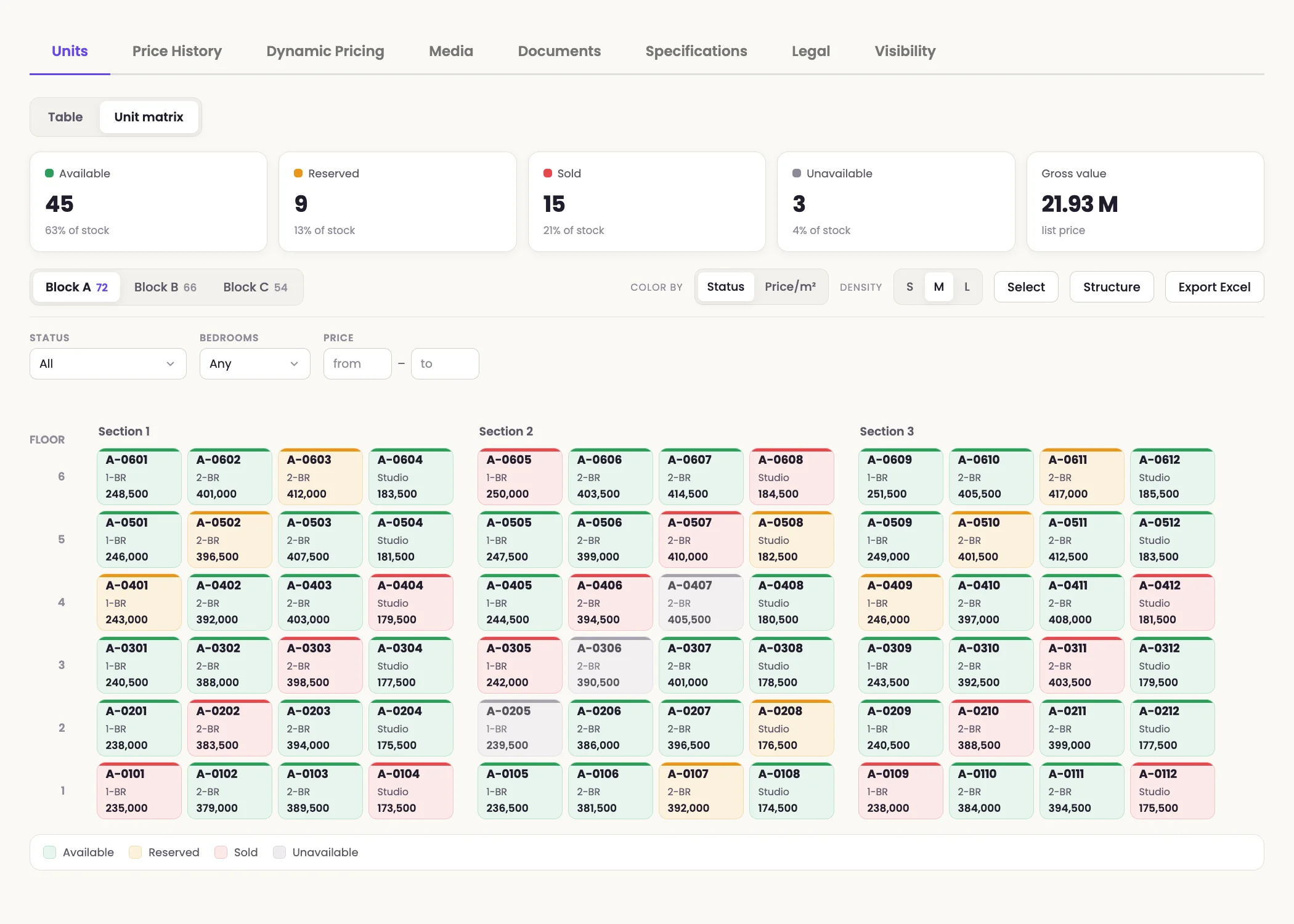
Every unit in the project on one grid: floor, type, area, status, price.

A price list for one project or the whole portfolio, built by itself: your columns, your cover, a public link instead of a file by email.

Rules price the units for you: floor, view, area, stage.

The full price history of a unit: who changed it, when, and by how much.

Layouts, photos, video, brochures and decks live on the project and the unit — not in someone's folder.

One record per unit that every other module reads: layout, price, status, documents and media. Price lists build themselves from it.

1
home for the whole portfolio
5 min
to price the units
up to 20%
margin increase

CRM

A funnel of its own for each stream; they never mix.

A deal moves through stages, and you can see where each one stalled.

The reservation and the agreement are assembled from the deal card; nothing is retyped.

Buyer details are pulled out of the conversation itself, not filled in by hand.

One person, one card: every touch and every unit they viewed, with no duplicates.

Demand and deals: every enquiry, its owner, its stage — and the documents that come out of it.

3
funnels
5 seconds
for the assistant to reply
0
unanswered leads

Omni-chat

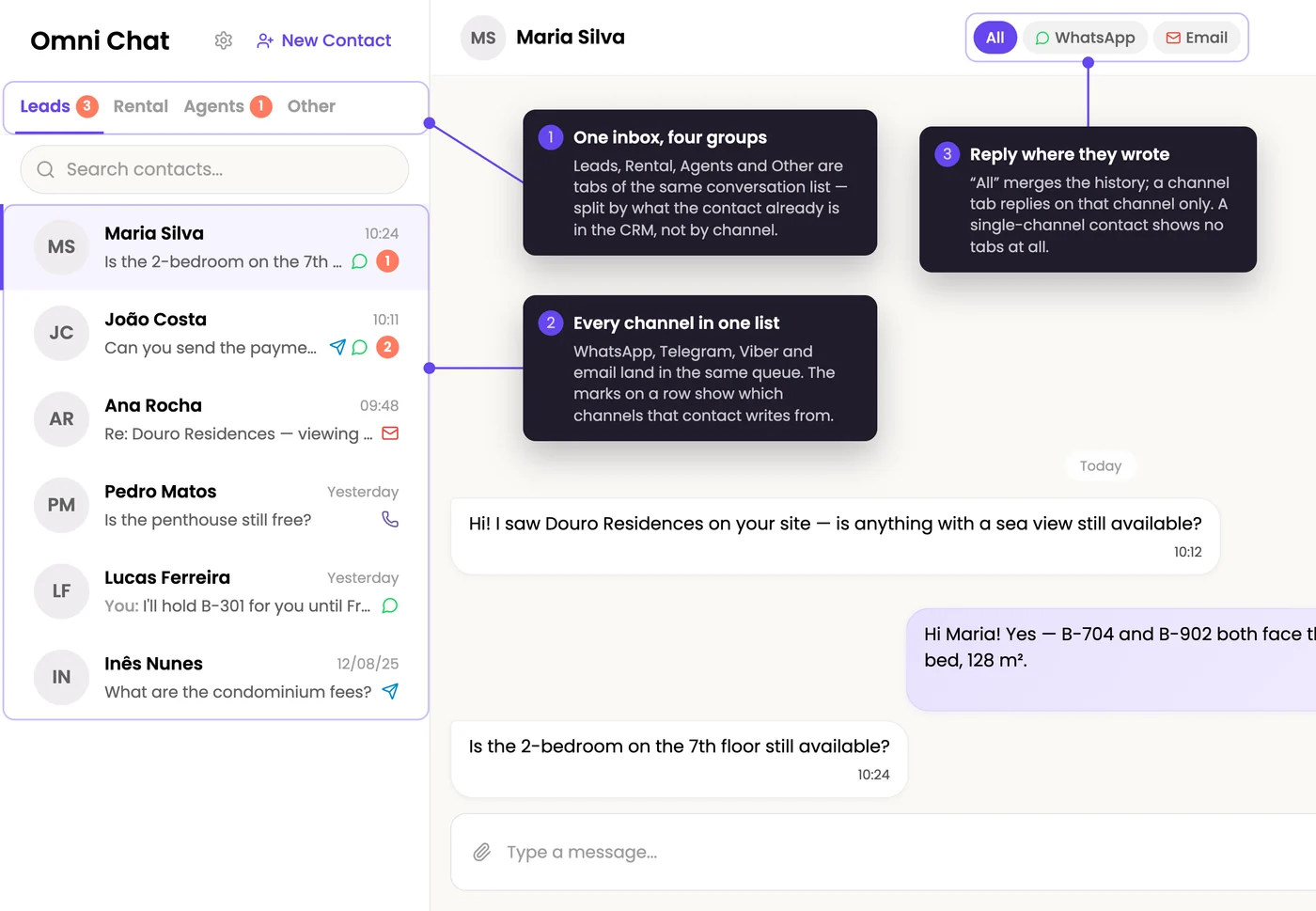
WhatsApp, Telegram, Viber, email and site forms in one queue; nothing sinks into a manager's personal phone.

Send a plan, a price list, a master price list or an offer straight from the conversation, as a file or a link.

The assistant answers at night and on weekends, in the buyer's language.

Agents write into the same window as buyers, with a filter by agent.

Every channel buyers write from, answered in one window — by your team or by the assistant, around the clock.

1 window
all channels
infinity
conversations in one window

Showroom

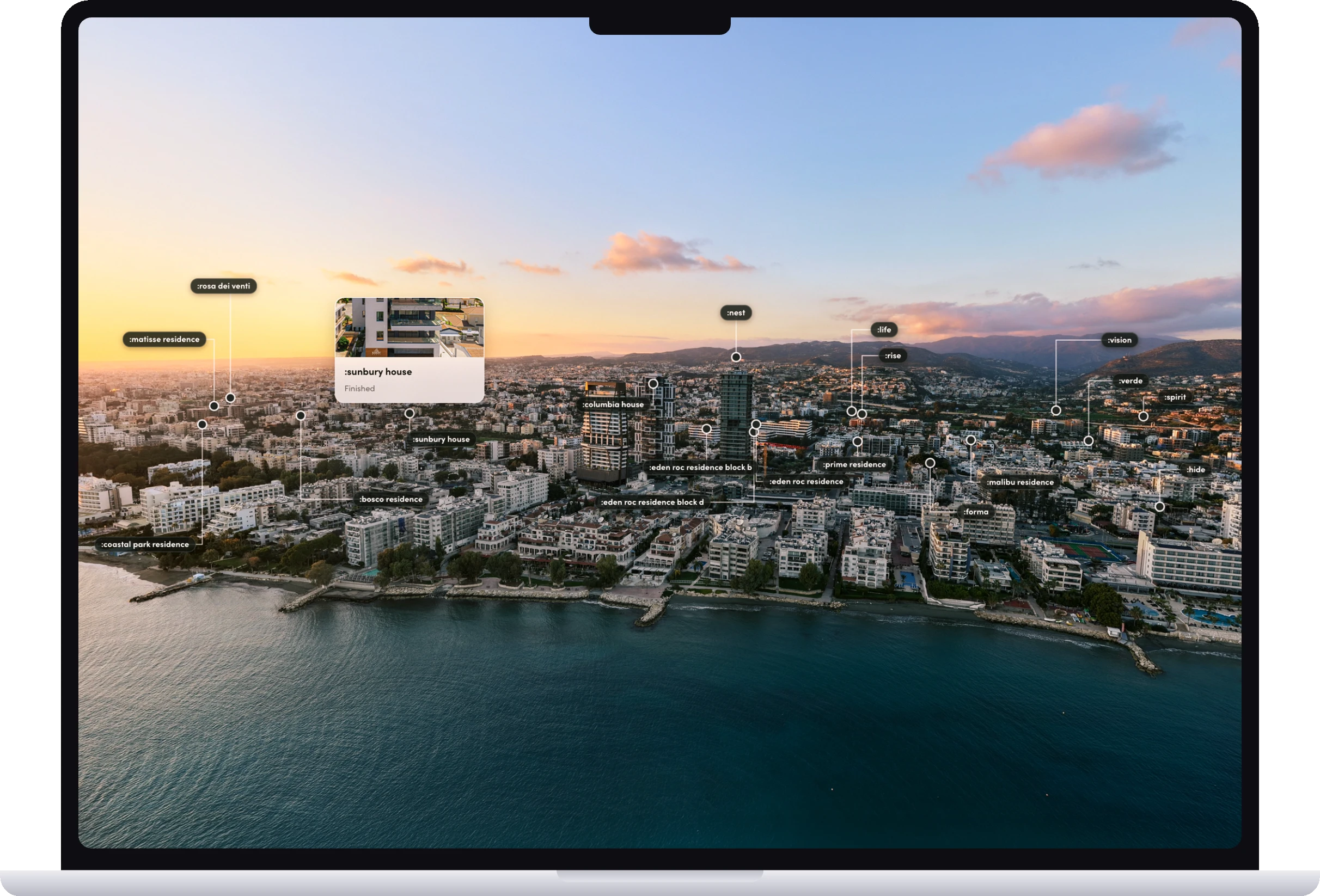
A drone flight and the surroundings: streets, infrastructure, what is nearby.

Click a building, a floor, a unit: the choice happens on the picture, not in a table.

The project turns, and it reads from any side.

A building buyers can explore before it is built. It drops into your existing site with one embed — no separate page to develop.

40%
longer time on site
360°
project overview

Marketing

A developer storefront for the whole portfolio: set it up, publish, it works.

A project landing built from your units, showing live prices.

The project's photos and video are generated from its own materials — from text, from a render, from a photo — with no shoot.

Cold leads are raised again, with a reason to reply.

The materials for a new project are assembled from your own portfolio, not ordered from an agency for six weeks.

5 minutes
for a project landing
10 minutes
for a developer storefront
$0
to connect landings, site and CRM

Agent portal

Access for agents and agencies: each sees only the part of the portfolio you opened.

Who actually sells: cuts by portal, agent and project over a period.

A broadcast to agents: new projects, price changes, terms.

Your own domain and logo on the portal; you decide what the agent gets: price list, offer, selection, reservation.

A workspace for the agencies that sell your units: live stock, their own clients, their own numbers. An agent registers a buyer — and the system fixes the source, not the correspondence.

7× faster
agent onboarding
10 minutes
to launch the portal

Qube Residence

on request

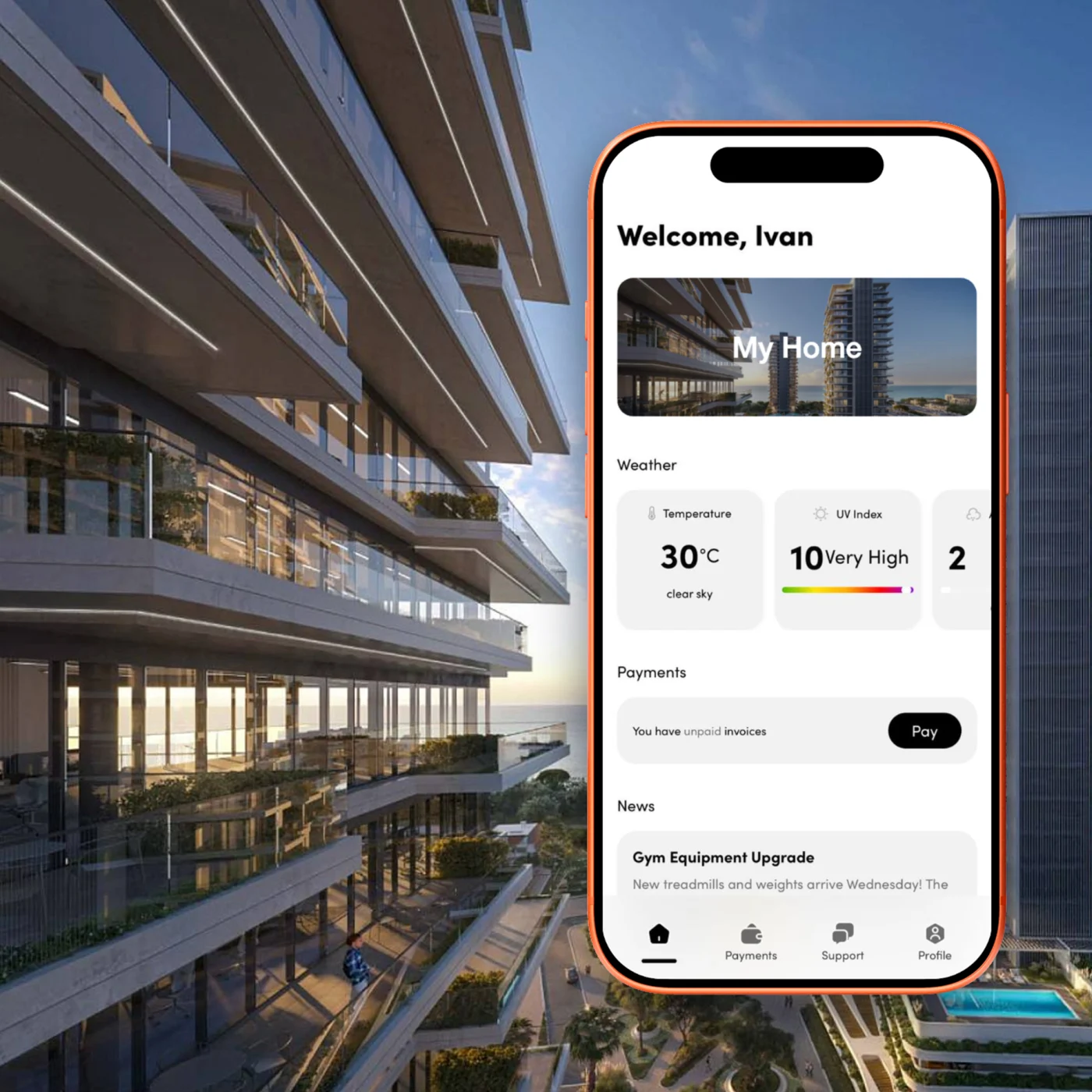
Your name, your colours, your App Store listing. QubeHub stays the engine.

The buyer meets the app while the project is still selling.

Unit, documents and payment schedule carry over from the deal.

Your brand on the standard app, your design language across it, or a front end for one flagship.

Your project. Your brand. Your app. A resident app for premium developments — the same record that sold the unit runs the building.

Request a consultation →

After sales

coming soon

The buyer's own account: their unit, their documents, their dates.

What is paid, what is next and when.

Upsells at the right moment: parking, storage, finishes.

visual coming

The stretch between the contract and the keys — visible to both sides, without calls asking what's happening with the payments.

In every hub.

Who sees what. What your systems can read. How your process is set up.

Team & Security

You decide who sees what.

Permissions go down to a single menu item, so an agency sees its own projects and nothing more. Every price change, every access granted, every deleted lead is written down with a name and a time — the question “who did this?” always has an answer.

RolesUsersActivity Log

Settings

Talks to what you already run.

Your developers get a key that reads exactly what you allow — a key for leads cannot touch prices. And your systems don’t have to ask every hour: they are told the moment something changes.

API KeysWebhooks

Customization

Set up the way you already sell.

Your deal stages, your fields, your own rules for moving a deal forward. And the contract goes out with the right legal entity because it is taken from the project record — not from someone’s memory.

Pipeline rulesAutomationsLegal EntitiesCustom Fields

Book a demo

Ivan Kozheurov, founder of QubeHub

Ivan Kozheurov

Founder

The market judges you by what it sees — not by the tools or the team behind it. See what it will see.

QubeHub tailored demo

What should we demonstrate first?

Choose the workflow most relevant to your team. The booking button opens QubeHub's current calendar.

No data is collected in this step. The next step opens the official QubeHub booking calendar.

Choose a time →

Discuss a project

Write to us

Fill the form below — we reply by email.

Book a call →

Pick a time in the calendar.

Your hub

Request your price.

Three fields and we're done — the parts you marked come with the request.

Write to us

Fill the form below — we reply with the price.

Book a call →

Pick a time in the calendar.

Your portfolio
Billed as 40 units minimum

QubeHub starts at 40 units — smaller portfolios are billed as 40.

We reply with the price for your setup within one business day.

QubeHub onboarding

From your current portfolio to a live hub in 1–14 days.

If your project data is ready and the setup is focused, we can get you live in a day. Larger portfolios, teams and connected workflows are configured through the same onboarding process.

You provide

  • Project and unit data
  • Current pricing and availability
  • Approved sales materials
  • Team and broker access
  • Access to existing systems where integration is required

QubeHub handles

  • Portfolio setup and data structure
  • Module configuration
  • Permissions and access
  • Connected sales surfaces
  • Testing
  • Team onboarding
  • Launch

Timeline

  1. Day 1 — Focused setup live

    A ready project can be configured and launched.

  2. Day 3 — Portfolio configured

    Projects, units, pricing and required modules are in place.

  3. Day 7 — Team & channels connected

    Team, brokers and sales surfaces are connected.

  4. Day 14 — Broader rollout live

    The wider commercial setup is operating from the same current portfolio.

Standard onboarding: 1–14 days. Custom integrations can be scoped separately.

Email QubeHub

Tell us what you're working with.

Prefer email? Send us the context and we'll reply there.